Chat Screenshot Analyzer for Dating Texts
A chat screenshot analyzer helps you understand what is happening in a real text conversation: tone, intent, mixed signals, missing context, and what to say next.
KnoKno is built for the dating and relationship version of this problem. Instead of giving generic advice, it reads the conversation and turns it into a clear next move.
From screenshot to reply strategy
Upload a chat screenshot or paste the thread. KnoKno analyzes the signal, explains the risk, and suggests a reply that fits the relationship context.
Analyze a Chat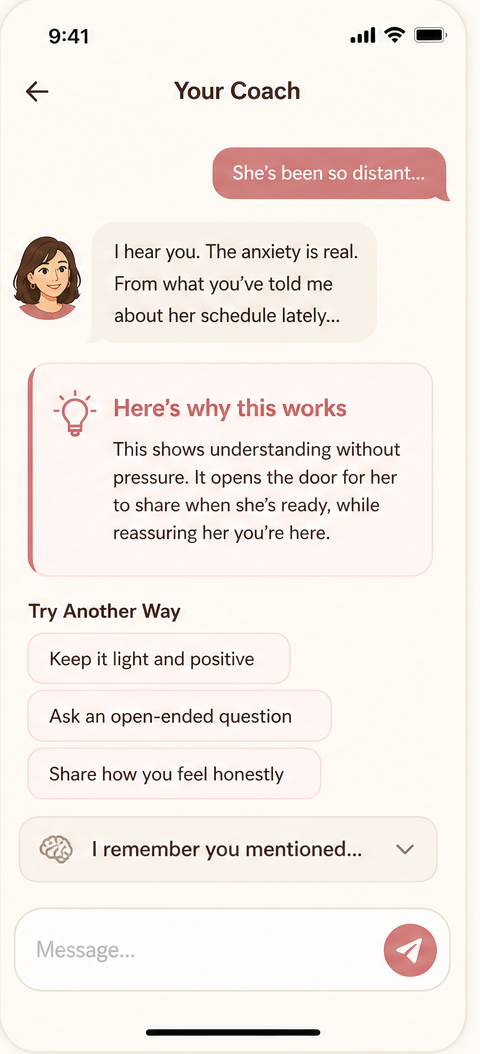
What a Chat Screenshot Analyzer Looks For
Tone
Is the message warm, distant, playful, defensive, curious, or avoidant?
Intent
Are they inviting connection, setting a boundary, stalling, flirting, or closing the loop?
Next move
Should you clarify, flirt back, slow down, make a plan, or stop chasing?
How to Use KnoKno With a Screenshot
1. Bring the real chat
Upload a screenshot from iMessage, Tinder, Hinge, Bumble, Instagram DMs, WhatsApp, or another chat app.
2. Add your goal
Tell KnoKno whether you want to flirt, repair tension, ask for clarity, set a boundary, or plan a date.
3. Choose the reply
Review the coach explanation, then use the reply that sounds like you.
Example Analysis
Message: "Sorry, this week has been a lot. Maybe another time."
Signal: This could be a soft no, or it could be real overwhelm. The missing detail is whether they offer another time or show interest elsewhere.
Possible reply: "No worries. Sounds like you have a full week. If you want to find another time when things calm down, I am open to it."
Why it works: It is warm, leaves the door open, and does not pressure them to reassure you.
Best Use Cases
Left on read
Decide whether to follow up, wait, or stop investing.
Dry replies
Tell whether the energy is low or the connection is fading.
Mixed signals
Separate interest, avoidance, politeness, and ambiguity.
After a first date
Choose a confident follow-up without sounding too intense.
Conflict repair
Apologize, clarify, or set a boundary without escalating.
Dating app matches
Turn flat app chats into better questions and real plans.
Privacy Matters
Dating screenshots can include intimate context. KnoKno has no social feed, does not sell your conversations, and is designed around private coaching rather than public sharing.
You should still avoid uploading anything that you are not comfortable processing through an AI service, and you should remove unrelated personal information when possible.
Analyze the text before you reply
Use KnoKno to understand the message, choose the tone, and send a reply that fits the real context.
Try It With a ChatFAQ
Can AI analyze a chat screenshot?
Yes. A multimodal AI system can read text in an image and reason about the conversation, but the quality depends on context and the coaching workflow around it.
What apps can KnoKno analyze screenshots from?
You can bring screenshots from common chat and dating apps, including iMessage, Tinder, Hinge, Bumble, Instagram DMs, WhatsApp, and similar messaging apps.
Can a screenshot analyzer tell if someone likes me?
It can identify signals and patterns, but it cannot know another person's inner thoughts with certainty. The best analysis gives probabilities and a smart next move.
Is it better to paste text or upload a screenshot?
Either can work. Screenshots preserve the real conversation flow, while pasted text is useful when you want to remove extra personal details.